
Spain’s foreign trade, province by province: a decade of commercial intelligence, ready for real decisions
Spain is one of the most important economies in Europe. Traditional data from most platforms only provides aggregate figures, and getting the granularity of which province imports or exports what is a monumental task.
I started the traditional way with Pandas, but each year of monthly trade data meant 3.5GB that required significant transformations — adding country names, product names, provinces, changing formats.
A single year ballooned to over 15GB of RAM if I wanted to process it annually. I tried Dask to speed things up — no luck. Then I decided to split it by quarter, but when I needed to consolidate everything into a single database, the same thing happened: out of memory. The question was: what do I do if I have more years?
I used lightning.ai, which offered credits and 250GB of RAM, but I burned through them quickly and then had to pay. I paid for Google Colab to run the first exercise and consolidate the initial years.
Recently, I asked Google Gemini what approach I could use and shared my notebook. It suggested DuckDB — I had never used it — so I let it guide me through the process. The result: I managed to consolidate the foreign trade database from 2015 to November 2025. Over 40GB of data, on a computer with 64GB of RAM (not all available for this process). I’ve also recently read an article published by Modexa discussing this type of database.
The question was, after all this effort, whether the database and the data were correct. The answer: YES.
So… which province buys the most from the world, and what product is it?
Spain’s total trade for 2025 was €809.2 billion. Of this, imports accounted for €424.7 billion — approximately 53%. This is the kind of data we can get from freely accessible platforms: aggregate totals that today lack meaning and relevance for businesses.
Saying that trade grew or that something was imported has real value for small and medium-sized enterprises trying to identify commercial opportunities from smaller countries. Trade makes countries grow, says the theory, but in practice it’s far more complex.
First question: Which province imported the most in 2024?
Barcelona. Madrid. Valencia. Zaragoza. Tarragona. These are the top five importing provinces — €240.0 billion (about 56.1% of the total). But there are important differences. Between the second and the third, the gap is three times larger. This begins to reveal Spain’s economic characteristics. One might think: let’s enter these provinces, let’s find clients. But they are complex, difficult.
Spain’s Accumulated Imports 2015–Oct. 2025, Values in Billions (B) in € (euros)
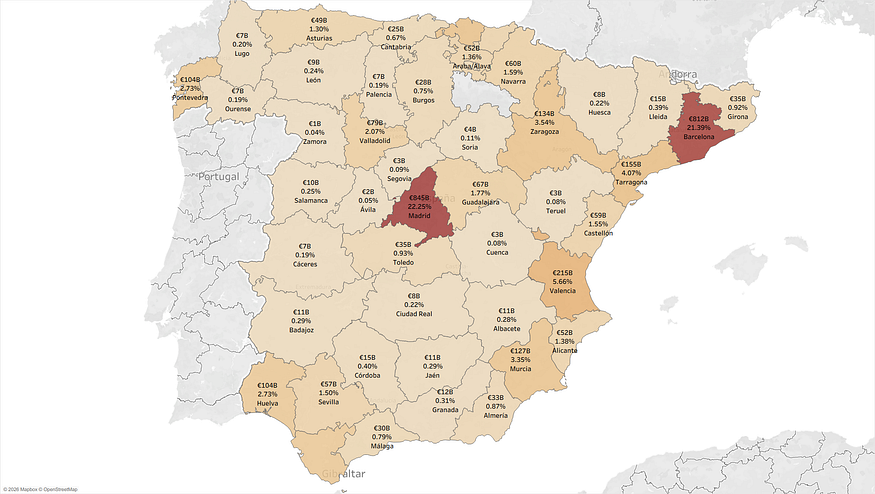
Source: Author’s own elaboration based on DataComex database.
Second question: Who is growing the most?
Volume isn’t everything — who is growing the most also matters. It indicates dynamism. To avoid annual fluctuations, I used CAGR (2015–2024), which gives an annualized growth rate between dates, similar to an investment return. The results changed.
Cuenca. Toledo. Segovia. Cáceres. Córdoba. These are the fastest growing — two to three times higher than total imports.
Growth (CAGR 2015–2024), Spanish provinces. €.
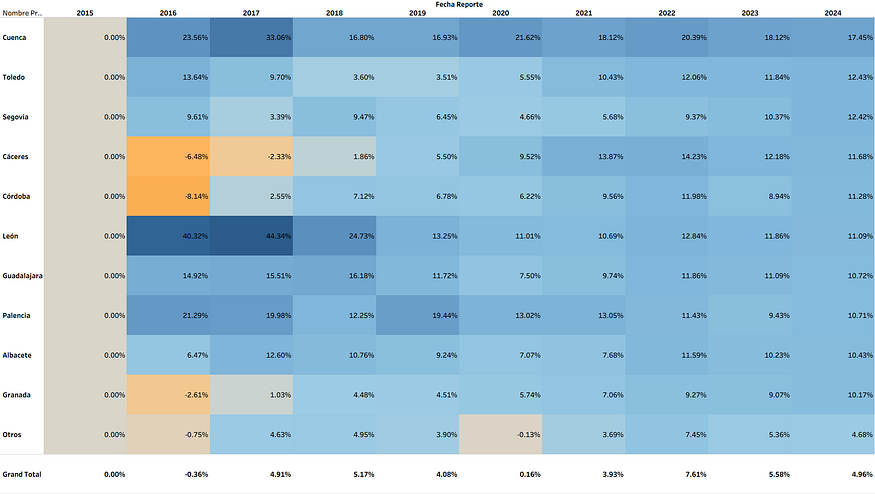
Source: Author’s own elaboration based on DataComex database.
Third question: What do Barcelona and Madrid buy the most? And we could answer this for each province…
Madrid
- Mainly: Pharmaceuticals, natural gas, immunological products, electricity, mobile phones — all industrial goods.
- Agricultural products: Tobacco, packaging, cereals, beef, cigars, coffee, water, Atlantic salmon.
Barcelona
- Vehicles, pharmaceuticals, natural gas, hydrogen, jet fuel.
- Agricultural products: Soybeans, coffee, oils, cocoa, cereals (corn), among others.
And so on — we could know this for each of Spain’s provinces.
Fourth question: Where does it come from?
Madrid
- Germany (13%), China (12%), United States (10%), France (10%), Italy (7%).
Barcelona
- Germany (17%), China (13%), France (9%), Italy (8%), Netherlands (4%), United States (3%).
And we can continue breaking down the information until we reach a detailed level.
Conclusion
If I had followed the traditional path, I wouldn’t have finished this project without paying. With DuckDB I did it in one week — an analysis I had been wanting to complete for over two years.
Learning. Risking. Concluding.
This exercise gave me granular information to identify real foreign trade opportunities. And that’s precisely what we do: we analyze data like this to find where the commercial opportunities are.
To connect those opportunities with real contacts and suppliers, we work with platforms like TradeAtlas.
If your company is looking for foreign trade opportunities, let’s talk at [email protected] or leave us a message.
—
This was the final code using DuckDB that made it possible to run this database from my computer, without paying anything extra:
#Consolidar todos los archivos nuevos de forma incremental
import duckdb
import time
import glob
import os
import pandas as pd

# --- CONFIGURATION ---
# Point to the PARENT folder containing year folders (2015, 2016, etc.)
ROOT_PATH = r"G:\Bases\España\Datos"
CATALOG_PATH = r"G:\Bases\España\Datos\Catalogos"
DB_FILE = "trade_database.duckdb"
FINAL_OUTPUT = "consolidated_trade_history.parquet"

def fix_path(path):
    return path.replace('\\', '/')

def run_production_pipeline():
    con = duckdb.connect(DB_FILE)
    print("🚀 Starting Production Pipeline...")

    # ---------------------------------------------------------
    # 1. SETUP & HISTORY TRACKING
    # ---------------------------------------------------------
    # Create the Master Table if it doesn't exist
    con.execute("""
        CREATE TABLE IF NOT EXISTS clean_trade (
            flujo VARCHAR,
            año INT,
            mes INT,
            fecha DATE,
            cod_pais VARCHAR,
            nombre_pais VARCHAR,
            cod_provincia VARCHAR,
            nombre_provincia VARCHAR,
            cod_taric VARCHAR,
            descripcion_taric VARCHAR,
            euros DOUBLE,
            dolares DOUBLE,
            kilogramos DOUBLE,
            source_file VARCHAR
        )
    """)

    # Create a Log Table to remember processed files
    con.execute("CREATE TABLE IF NOT EXISTS processed_log (filename VARCHAR, process_date TIMESTAMP)")

    # Get list of already processed files
    processed_files = set(row[0] for row in con.execute("SELECT filename FROM processed_log").fetchall())
    print(f"📜 System remembers {len(processed_files)} previously processed files.")

    # ---------------------------------------------------------
    # 2. SCAN FOR NEW DATA (2015-2025+)
    # ---------------------------------------------------------
    # Look for year folders 20xx
    year_folders = glob.glob(os.path.join(ROOT_PATH, "20*"))

    candidate_files = []
    for year_folder in year_folders:
        # Get CSVs strictly inside the year folder (ignore subfolders like 'Trimestre')
        files = glob.glob(os.path.join(year_folder, "*.csv"))
        candidate_files.extend(files)

    # Filter: Keep ONLY files we haven't seen yet
    new_files = [f for f in candidate_files if fix_path(f) not in processed_files]

    if not new_files:
        print("✅ No new files found. Data is up to date.")
    else:
        print(f"⚡ Found {len(new_files)} NEW files. Starting incremental processing...")

        # ---------------------------------------------------------
        # 3. PROCESS NEW FILES (Incremental Batch)
        # ---------------------------------------------------------
        # Load Catalogs (Only needed if we have new files to process)
        p_paises = fix_path(os.path.join(CATALOG_PATH, "PAISES.csv"))
        p_sectores = fix_path(os.path.join(CATALOG_PATH, "SECTORES.csv"))
        p_taric = fix_path(os.path.join(CATALOG_PATH, "TARIC.csv"))
        p_provincias = fix_path(os.path.join(CATALOG_PATH, "PROVINCIAS.csv"))

        con.execute(f"""
            CREATE OR REPLACE TABLE paises AS SELECT * FROM read_csv('{p_paises}', delim='\\t', encoding='UTF-16', header=True, ignore_errors=True);
            CREATE OR REPLACE TABLE sectores AS SELECT * FROM read_csv('{p_sectores}', delim='\\t', encoding='UTF-16', header=True, types={{'cod_sec': 'VARCHAR'}});
            CREATE OR REPLACE TABLE taric_cat AS SELECT * FROM read_csv('{p_taric}', delim='\\t', encoding='UTF-16', header=True, types={{'cod_taric': 'VARCHAR'}});
            CREATE OR REPLACE TABLE provincias AS SELECT * FROM read_csv('{p_provincias}', delim='\\t', encoding='UTF-16', header=True, types={{'cod_provincia': 'VARCHAR'}});
        """)

        # Sanitize paths for SQL
        clean_paths = [fix_path(f) for f in new_files]
        files_sql = "[" + ", ".join([f"'{f}'" for f in clean_paths]) + "]"

        # ---------------------------------------------------------
        # A. Robust Load (Smart Encoding Detection)
        # ---------------------------------------------------------
        print("⏳ Reading CSVs with auto-recovery (Mixed Encodings)...")

        # 1. Create the Staging Table structure first (Empty)
        # We perform a dummy read of the first file just to get the columns/types
        first_file = clean_paths[0]
        con.execute(f"""
            CREATE OR REPLACE TABLE staging_raw AS
            SELECT * FROM read_csv('{first_file}',
                delim='\\t',
                encoding='UTF-16',
                header=True,
                filename=True,
                types={{'cod_taric': 'VARCHAR', 'pais': 'VARCHAR', 'provincia': 'VARCHAR'}}
            ) LIMIT 0;
        """)

        # 2. Loop through every file and try to append it safely
        success_count = 0
        error_count = 0

        for f in clean_paths:
            try:
                # Attempt 1: Try UTF-16 (Most common for your data)
                con.execute(f"""
                    INSERT INTO staging_raw
                    SELECT * FROM read_csv('{f}',
                        delim='\\t',
                        encoding='UTF-16',
                        header=True,
                        filename=True,
                        types={{'cod_taric': 'VARCHAR', 'pais': 'VARCHAR', 'provincia': 'VARCHAR'}}
                    )
                """)
                success_count += 1

            except Exception as e:
                # If UTF-16 fails, the file is likely UTF-8 or Latin-1
                print(f"⚠️ UTF-16 failed for {os.path.basename(f)}. Retrying with Latin-1/Auto...")
                try:
                    # Attempt 2: Let DuckDB Auto-Detect (Handles UTF-8/Latin-1)
                    con.execute(f"""
                        INSERT INTO staging_raw
                        SELECT * FROM read_csv('{f}',
                            delim='\\t',
                            auto_detect=True, -- Let DuckDB figure it out
                            header=True,
                            filename=True,
                            types={{'cod_taric': 'VARCHAR', 'pais': 'VARCHAR', 'provincia': 'VARCHAR'}}
                        )
                    """)
                    print(f"   ✅ Recovered {os.path.basename(f)} using Auto-Detect.")
                    success_count += 1
                except Exception as e2:
                    print(f"❌ FAILED to read {os.path.basename(f)}. Skipping.")
                    print(f"   Error: {e2}")
                    error_count += 1

        print(f"📦 Staging complete. Success: {success_count} | Failed: {error_count}")

        # C. Update Log
        print("📝 Updating history log...")
        for f in clean_paths:
            con.execute(f"INSERT INTO processed_log VALUES ('{f}', current_timestamp)")

 # ---------------------------------------------------------
    # 4. QUALITY CHECK (Corregido)
    # ---------------------------------------------------------
    print("\n🔍 --- DATA QUALITY REPORT ---")

    # Check 1: Row count by Year
    print("1. Rows per Year:")
    # CORRECCIÓN: Usamos .df() para convertir a Pandas y luego imprimir
    df_yearly = con.execute("SELECT año, count(*) as records, round(sum(euros)/1e9, 2) as billion_euros FROM clean_trade GROUP BY año ORDER BY año").df()
    print(df_yearly)

    # Check 2: Missing Countries?
    print("\n2. Rows with Unknown Country (Should be 0):")
    unknowns = con.execute("SELECT count(*) FROM clean_trade WHERE nombre_pais IS NULL").fetchone()[0]
    print(f"   -> {unknowns} rows")

    # Check 3: Missing Products?
    print("3. Rows with Unknown TARIC codes:")
    unknown_taric = con.execute("SELECT count(*) FROM clean_trade WHERE descripcion_taric IS NULL").fetchone()[0]
    print(f"   -> {unknown_taric} rows")

    # ---------------------------------------------------------
    # 5. EXPORT CONSOLIDATED FILE
    # ---------------------------------------------------------
    # Only export if we added new files OR if the file doesn't exist
    if new_files or not os.path.exists(FINAL_OUTPUT):
        print(f"\n💾 Writing FULL consolidated history to {FINAL_OUTPUT}...")
        # Overwrite the big file with the latest master data
        con.execute(f"COPY clean_trade TO '{FINAL_OUTPUT}' (FORMAT PARQUET)")
        print("✅ Consolidated File Updated.")
    else:
        print("\n⏩ No new data, skipping export to save time.")

    con.close()

if __name__ == "__main__":
    run_production_pipeline()